Vendor SMS Opt-In Process
How vendors are enrolled in maintenance job text alerts on CasafloIQ.
CasafloIQ (casafloiq.com) is a property-maintenance coordination platform for independent landlords and property managers. Property managers use CasafloIQ to route maintenance job requests to the vendors and contractors they already work with, by text message.
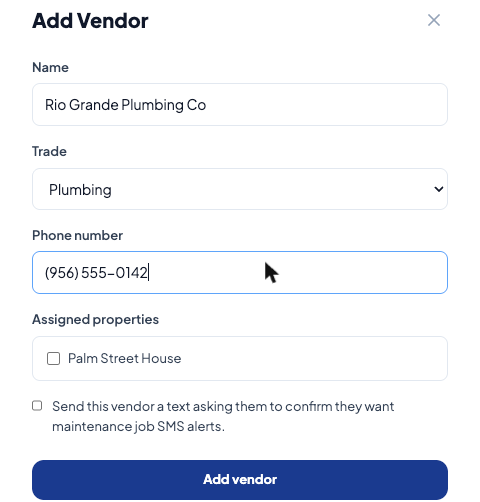
Vendors do not sign up on a public page.A vendor is added to a property manager’s account from inside the property manager’s own CasafloIQ dashboard, which requires an authenticated login. Because that screen isn’t publicly reachable, this page documents exactly what happens there and includes a screenshot of the actual opt-in checkbox, so the flow can be reviewed without a login.
How a vendor opts in
- A property manager adds a vendor’s name, trade, and phone number in their CasafloIQ dashboard. Next to those fields is a checkbox, unchecked by default: “Send this vendor a text asking them to confirm they want maintenance job SMS alerts.” See the screenshot below.
- If the property manager checks that box and saves, CasafloIQ sends the vendor a one-time text — it does not grant consent by itself, it only asks:
“You’ve been added as a vendor contact by [Landlord Name] via CasafloIQ, a property-maintenance coordination platform. Reply YES to receive maintenance job text alerts. Msg frequency varies. Msg & data rates may apply. Reply STOP to unsubscribe.”
- No maintenance job messages are sent to the vendor until the vendor replies YES themselves. Consent is recorded only from that reply — never granted by the property manager on the vendor’s behalf. Once the vendor replies YES, CasafloIQ confirms:
“You are now opted in to receive maintenance job SMS notifications from CasafloIQ. Msg frequency varies. Msg and data rates may apply. Reply STOP to unsubscribe.”
- From then on, the vendor receives approximately one text per maintenance job routed to them by that property manager. Message frequency varies. Message and data rates may apply. The vendor can reply STOP at any time to opt out immediately, or HELP for assistance.
Screenshot: the opt-in checkbox
The “Add Vendor” form inside a property manager’s CasafloIQ dashboard. The consent checkbox is unchecked by default, as shown.
Full terms
Full disclosures are in our Terms of Service (Section 4) and Privacy Policy (Section 3).